
Basics of GitHub Actions
The GitHub's event-driven automation framework

GitHub actions is the github.com’s event-driven automation framework. It’s usually used for CI/CD. The events that trigger the automation are things like pushing commits to a branch or creating a pull request.
The main components are the workflows that are defined within YAML files living at .github/workflows. They contain one or more jobs.
# .github/workflows/first.yaml
name: first-workflow
on: push # event that triggers the workflow
jobs:
  echo:
    runs-on: ubuntu-latest # job's runner
    steps:
      - name: echo step
        run: echo 'Hello world!' # shell command
Job is a collection of steps that run on an individual compute instance called a runner. By default jobs have no dependencies and run in parallel (if enough runners are available).
Steps are tasks that run in a context of a job’s runner. Steps share files but changes to environment variables don’t carry over to the next step. A step is a shell command or an action.
An action (hence the name) is a pre-defined, reusable set of jobs or code that performs specific tasks. You can find actions in the Marketplace or you can write your own.
CI automation
Now let’s create a realistic continuos integration workflow. CI means that code is being developed and continuously merged to a branch (like main) that should stay releasable and/or deployable. To guard against code changes that would break or lower the quality of the code being merged, we can create a workflow with some tests:
Test job
First let’s create the triggers:
name: ci-automation
on:
  push:
    branches:
      - main
  pull_request:
    branches:
      - main
This means that the ci-automation workflow will get triggered on two events:
push to
mainbranch - when commits are pushed directly tomainpull request targeting
main- when a PR is opened againstmain
Next when define what to do on these events:
jobs:
  test:
    strategy:
      matrix:
        go-version: [ 1.25.x, 1.26.x ]
        os: [ ubuntu-latest, macos-latest, windows-latest ]
    runs-on: ${{ matrix.os }}
    steps:
      # It's idiomatic to not use name for a common action.
      - uses: actions/checkout@v6
      - name: install go
        uses: actions/setup-go@v6
        with:
          go-version: ${{ matrix.go-version }}
      - name: lint with golangci-lint
        uses: golangci/golangci-lint-action@v9
      - name: run go test
        run: go test ./...
Here’s one job called test. The matrix strategy allows us to define two arrays that will help us generate six parallel jobs (2x3) out of this job. The steps do the following:
check out (clone) the repo code
install the Go version from the matrix
lint the Go code to catch style and static analysis issues
test the Go code
Release job
We might also want to release our software so that people can download it. Let’s add a release job:
# ... snip ...
on:
  push:
    tags:
      - v*
# ... snip ...
jobs:
# ... snip ...
  release:
    needs: test
    if: startsWith(github.ref, 'refs/tags/v')
    runs-on: ubuntu-latest
    permissions:
      contents: write
    steps:
      - uses: actions/checkout@v6
        with:
          # required for the changelog to work correctly
          fetch-depth: 0
      - name: run goreleaser
        uses: goreleaser/goreleaser-action@v7
        with:
          args: release --clean
        env:
          GITHUB_TOKEN: ${{ secrets.GITHUB_TOKEN }}
We added a trigger that runs when a version tag (e.g., v0.0.1) is pushed. And we added the release job that is dependent on the test and runs only for tags starting with v. The job also needs write permissions so it can create a release using an automatically generated GITHUB_TOKEN. The job’s steps do the following:
check out (clone) the repo code
create release for multiple CPU architectures and operating systems
To trigger the release job:
$ git tag v0.0.1
$ git push origin v0.0.1
You can find the full code here. Check the “Actions” tab for visualization of the workflows and jobs:
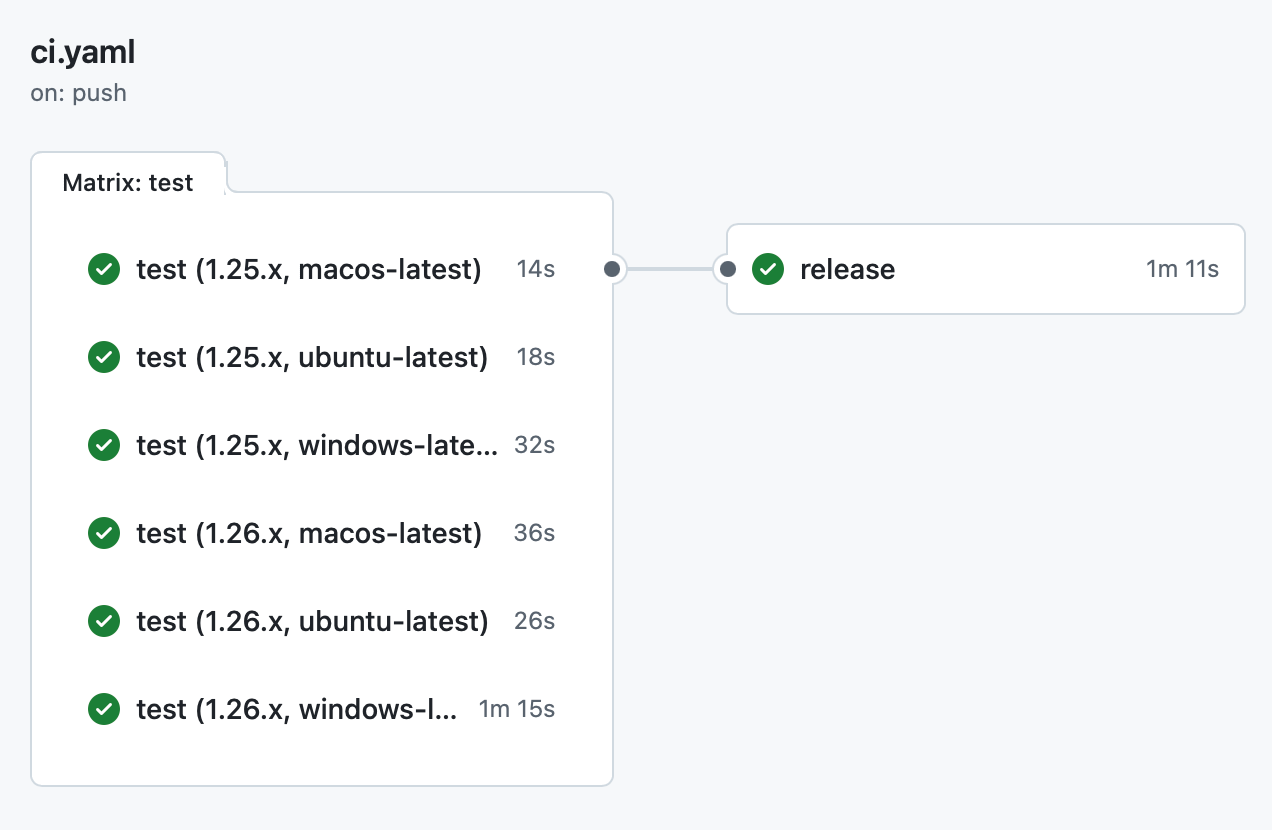
Click on a test or release job to see the steps.